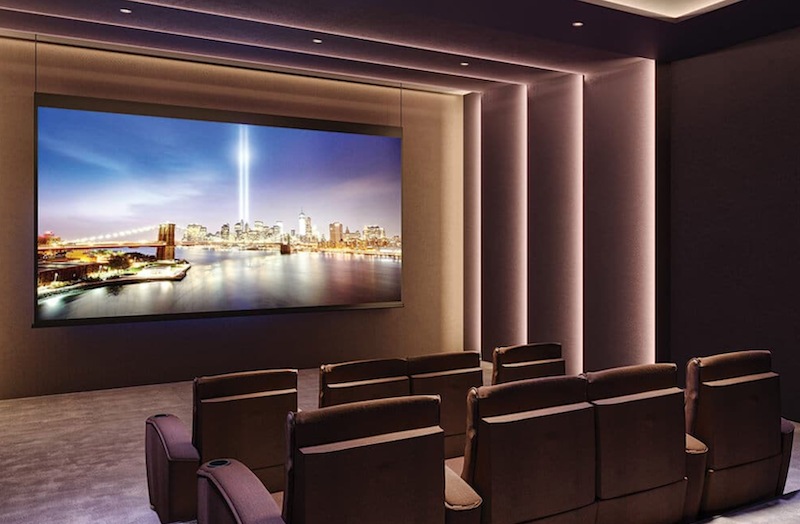
Thinking About Upgrading Your Home Audio & TV? Start Here.
Maybe you’ve just bought a new home, you’re remodeling, or you’re finally ready to upgrade those old TVs and speakers. The problem? Once you start shopping, the options can feel endless.
How much should you spend? Do you need a sound system? Is WiFi enough? Should you choose a projector or one of today’s giant TVs?
At IGS Homeworks, these are the questions we answer every day. Here are some of the most common questions homeowners ask when they call an AV company in Houston.
Audio Visual FAQs
1. How much does it cost to install speakers?
The honest answer is—it depends on what you’re trying to achieve.
A few things affect the overall cost:
- Are the ceilings easy to access?
- Does new speaker wire need to be installed?
- Are you listening to music, TV audio, or both?
- Are these speakers for everyday background music or a space where sound quality really matters?
We typically recommend 8-inch in-ceiling speakers for living rooms, patios and other primary entertainment spaces because they deliver fuller, richer sound than smaller speakers.
Speaker quality also makes a huge difference. Premium brands like Bowers & Wilkins produce noticeably better sound than entry-level alternatives, while companies like Leon Speakers and SVS make beautiful bookshelf speakers that become part of the room’s design instead of something you try to hide.
As a general guide, homeowners usually spend between $220 and $1,000 per speaker, depending on performance and style.
If you’re working within a budget, invest in premium speakers where you’ll use them the most, then choose more economical options for secondary rooms.
Top Tip: Make sure your proposal clearly includes the cost of speaker wiring. It’s an easy detail to overlook.
2. How do I know what size and model of TV is right for me?
Instead of asking, “What’s the biggest TV I can fit?” ask yourself:
“What will I be watching, and where?”
A TV in a family room has different requirements than one in a dedicated media room or a guest bedroom.
If you’re a sports fan or gamer, you’ll benefit from a higher-end display with better motion handling and refresh rates. If it’s mainly for casual viewing, you may not need the flagship model.
As a rough guide:
- Sitting about 5 feet away? A 55-inch TV works well.
- Around 6 feet? Consider a 65-inch.
- The farther you sit, the larger the screen should be.
One thing we’ve learned over the years: homeowners almost never regret buying a TV that’s slightly larger. They do regret buying one that’s too small for the wall.
For premium performance, Samsung’s latest Micro RGB TVs offer incredible brightness and vibrant colors that rival OLED technology, making them especially impressive for sports, movies and nature documentaries. For guest rooms or home offices, a quality LED model is often the smarter investment for TV installation.
3. Should I get a projector and screen, or a TV for my home theater?
This question has become much more common now that TVs are available in sizes up to 115 inches.
The right answer depends on the experience you’re trying to create.
If you want the traditional movie theater feel, a projector paired with a high-quality screen is still hard to beat. We often recommend Screen Innovations, whose award-winning Black Diamond Fusion screens perform exceptionally well even in rooms with ambient light.
On the other hand, today’s extra-large TVs provide stunning brightness, incredible picture quality and almost zero maintenance.
We’ll help you compare both options based on your room, your budget and how you actually use the space.
4. What’s the best surround sound system for my home?
If you’ve ever heard people talk about a “5.1” or “7.1.4” system, it sounds more complicated than it really is.
A standard 5.1 surround sound system includes:
- Left, center and right front speakers
- One subwoofer for deep bass
- Two rear surround speakers
From there, systems can be expanded with additional speakers and overhead Dolby Atmos channels for an even more immersive experience. We explain this more in our home theater set up page here.
If you’re working within a budget, our advice is always the same:
Buy fewer great speakers instead of more average ones.
Quality almost always beats quantity when it come to a home theater installation.
5. I have a 7 year old audio video receiver which I’d like to use. Will that work?
In many cases, yes.
If you already own a receiver that’s only a few years old, it may integrate perfectly into your new system.
However, older receivers sometimes struggle with modern video formats like 4K, HDR or advanced gaming features.
A good AV company should always evaluate the equipment you already own before recommending replacements. Sometimes keeping existing equipment can save thousands of dollars so make sure you tell them what you already have tucked away in a closet!
If you do need a new receiver, brands like Marantz, Denon and Sony continue to offer excellent options across a range of budgets.
5. Can I just connect TVs and speakers via WiFi?
Technically, yes.
Should I? Usually not.
Whenever possible, we recommend hardwiring devices like:
- Apple TV
- Roku
- Smart TVs
- Gaming consoles
Hardwired connections are faster, more reliable and reduce the number of devices competing for your home’s WiFi. This applies to TVs and speakers. Sonos is fantastic but also likes to take primary position on your WiFi as it creates a mesh system, so if we can hard wire at least one Sonos Amp, we will do that.
Save your wireless network for the devices that actually need it—phones, tablets and laptops.
If your home already has Cat5e or Cat6 wiring behind the TV, use it. If it doesn’t, it may be worth adding while the walls are accessible.
And don’t forget about power.
Before mounting a TV, make sure there’s an outlet in the correct location. Adding one during installation is much easier than scheduling a second visit later.
6. I’m loyal to cable for news and sports. Will my cable box connect to a new system?
Absolutely.
If you still enjoy cable for live news or sports, your equipment can easily be integrated into a new AV system.
That said, many homeowners are moving toward streaming services like DIRECTV Stream, YouTube TV and similar platforms. These work beautifully through Apple TV or Roku and often allow you to control everything with a single remote.
If you’re planning to keep a traditional cable box, simply let your installer know ahead of time so everything can be programmed correctly.
7. What about outdoor and landscape speakers?

Outdoor audio has become one of the most popular home upgrades.
Many newer homes already have wiring available for patio and landscape speakers. If not, we’ll explore the best route to install it while keeping everything neat and protected.
Today’s outdoor speaker systems offer much more than simple patio music.
For larger gardens and pool areas, systems like Coastal Source Razor speakers provide impressive, evenly distributed sound and include integrated bass without bulky equipment scattered around the yard.
The result is music that sounds natural throughout your outdoor space instead of blasting from one corner.
8. If something stops working, what is the warranty and repair process?
Every product has its own manufacturer’s warranty, but that’s only part of the picture.
At IGS Homeworks, we also stand behind our installation work. If there’s an issue caused by wiring or workmanship, we’ll take care of it.
If a product develops a fault, we’ll coordinate the warranty replacement with the manufacturer and get your system back up and running as quickly as possible.
We also offer service plans, which include annual health checks. Perfect for larger home automation systems.
Ready to Upgrade?
Whether you’re adding music to the patio, building the ultimate home theater or simply replacing an aging TV, investing in the right equipment makes your home more enjoyable every day.
The best systems aren’t necessarily the most expensive—they’re the ones designed around how you live.
If you’re not sure where to start, we’re always happy to help you explore the options and build a system that fits your home, your lifestyle and your budget. For some ball park numbers, why not try the Home Technology Association budget calculator below?